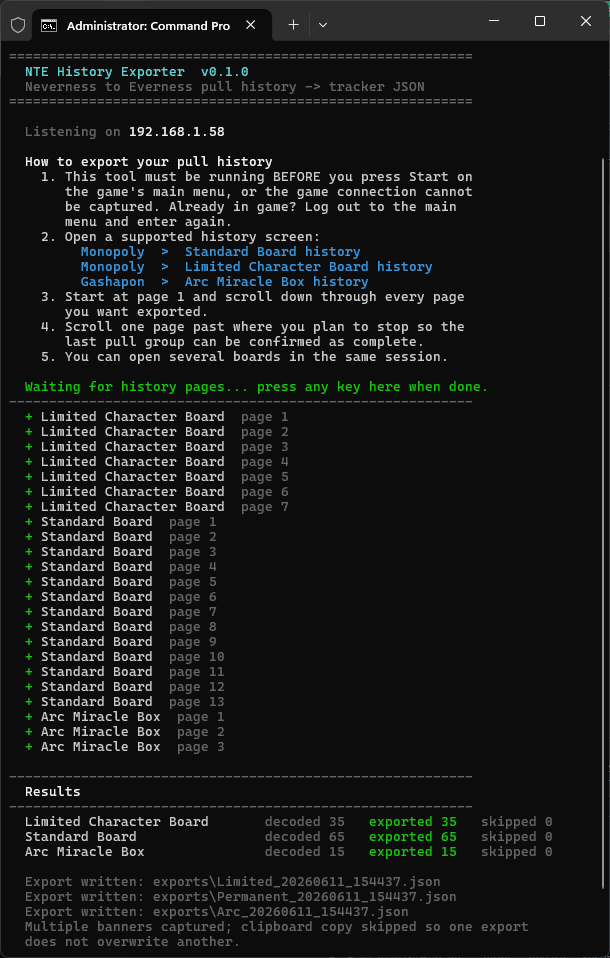
# NTE History Exporter
Prototype CLI exporter for **Neverness to Everness** pull history — decodes your own game traffic into sanitized JSON ready for tracker import.



## Supported Banners
| System | Banner | Banner ID | Pity pool |
| -------- | ----------------------- | -------------------------- | ---------- |
| Monopoly | Standard Board | `Lottery_Permanent` | Per-banner |
| Monopoly | Limited Character Board | `Lottery_LimitedCharacter` | Shared |
| Gashapon | Arc Miracle Box | `Arc_MiracleBox` | Shared |
## What It Does
The exporter decodes Permanent Board, Limited Character Board, and Arc Miracle Box history pages from captured UDP data, applies conservative timestamp-boundary handling, and writes sanitized JSON suitable for tracker import.
> [!NOTE]
> The import JSON contains decoded history rows and the shareable NTE user UID when it can be detected. It does **not** export tokens, account IDs, role IDs, device IDs, server IPs, raw packets, cookies, session data, or other capture metadata.
## Requirements
- Python 3.10 or newer.
- Packet-capture permission: Administrator on Windows, or root/capture capabilities on Linux and macOS.
- **Windows:** [Npcap](https://npcap.com/) is recommended. Install it normally; WinPcap API-compatible mode is not required. If Npcap is unavailable or cannot be initialized, `auto` falls back to the Windows built-in raw-socket backend.
- **Linux:** install the system **libpcap** runtime if it is not already present. Package names commonly include `libpcap0.8` on Debian/Ubuntu and `libpcap` on Fedora, Arch, and similar distributions.
- **macOS:** the system normally includes **libpcap**, so no separate Npcap installation is needed.
Npcap is Windows-only and is not bundled with this project. Linux and macOS use libpcap, the cross-platform capture library on which Npcap is based.
## Usage
### Live capture
The default `auto` capture backend uses:
- **Windows:** Npcap when installed, with automatic fallback to the built-in Windows raw-socket backend.
- **Linux/macOS:** the system libpcap library.
Use `--capture-backend libpcap` to require Npcap/libpcap without fallback, or `--capture-backend raw` to require the Windows raw-socket backend.
#### Windows (requires Administrator)
```powershell
.\run-exporter.ps1 --live
```
Or simply double-click **`run-exporter.cmd`** — it asks for confirmation before requesting Administrator privileges, and does nothing until you agree.
> [!IMPORTANT]
> For automatic user UID detection, launch the tool **before pressing Start on the game's main menu**. If you are already in game, history capture can still work; the tool will ask for your UID before saving if it cannot detect it automatically.
Once running, open any supported history board in game. The tool keeps listening until you press any key. Exports are written under `exports\` as:
- `